These guidelines are relevant for SMS and MMS compliance in the United States of America.
Deactivated numbers have been removed from service by mobile operators on the end-users’ behalf, typically because the end-user has switched operator or otherwise closed their account. Deactivated numbers are eventually recycled and activated for new subscribers. Because of this, it is easy to mistakenly send an unwanted text message to a previously deactivated number which has been reassigned to an end user who has not opted in to receive the text. Such unwanted texts are considered spam by the FCC and may incur fines of up to $1,500 per outbound message per end user, and could leave the message sender subject to class action litigation.
Note that mobile operators do not keep numbers inactive for a standardized period of time - some may reassign a deactivated number in as little as two days, while others may wait fifty (50) days before reassigning a number. To assist senders in maintaining subscriber lists which are aligned with industry best practices, carrier rules and legal requirements, some U.S. mobile operators provide deactivation files to Convey, which are accessible to Convey customers to cross-check and clean up subscriber records.
Retrieve Deactivation Files
Convey customers can access number deactivation files programmatically through a Convey endpoint. Request access to the files through a support request to the Convey Support Desk, and please refer our Number Deactivations API Documentation.
About Deactivation Files
Retrieving and processing the deactivation files as daily is important. The files are updated daily and the content of each file is incremental, containing only phone numbers for which the deactivation status has changed from the previous report. Because mobile operators can reassign inactive phone numbers in as little as two days’ time, it is crucial to process the deactivation files every day, and ensure that no further messages are sent to deactivated numbers until such a time as the number’s new subscriber chooses to opt in (at a date later than the date of deactivation). NOTE: use the preceding date value to retrieve the most recent file as the files are always one day behind of the current date.
We recommend that message senders contact the previous owner of a deactivated number to request their opt-in with their new number if possible.
File Property Details
| Scope | 1 file daily from participating carriers* |
| Content | deactivated numbers, changed numbers, suspended numbers (temporary state), reactivated number (un-suspended) |
| File Name | mcdn_deact_{YYYYMMDD}.csv (e.g. mcdn_deact_20230610.csv) |
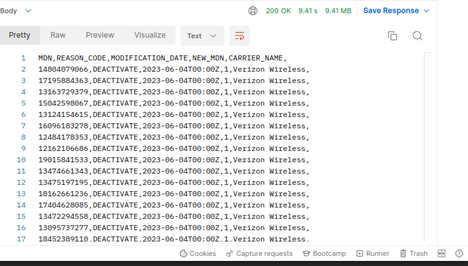
| Column Names | MDN, REASON_CODE, MODIFICATION_DATE, NEW_MDN, CARRIER_NAME |
| Format | csv |
* Participating carriers include Verizon Wireless, US Cellular Corp, T-Mobile and AT&T (displayed as “Cingular”).
File Content Details
| MDN | The unique Mobile Directory Number for which action is being taken, in E.164 format (i.e. “12223334444”). |
| REASON_CODE | DEACTIVATE - a disconnect event, or indication that the subscriber has elected not to receive messages SUSPEND (Verizon) - outbound messages to this MDN should be halted until reactivation. REACTIVATE (Verizon) - halted messages to a previously suspended MDN may resume. CHANGE_MDN - an old, deactivated MDN has been replaced with a new MDN. |
| MODIFICATION_DATE | A timestamp for the action in ISO 8601 format (the time zone will be zeroed out) (i.e. 2023-06-10T00:00Z). |
| NEW_MDN | A subscriber’s new MDN in E.164 format (i.e. 12223334444). This field will have a value of “1” if the REASON_CODE is not “CHANGE_MDN.” |
| CARRIER_NAME | The carrier who initiated the action. |
Example
Comments
0 comments
Article is closed for comments.