Text-Enable Business Numbers
Convey can text-enable most existing North American non-wireless voice telephone numbers to support SMS service, including toll-free. We refer to these as “BYON” - Bring Your Own Number.
- Requirements: Must provide Letter of Authorization.
- Acquisition: Contact Convey about our monthly BYON service fee.
Some things to keep in mind about BYON:
- text-enabling your existing number does not impact the voice service
- existing customers may initiate a support request to text-enable a BYON
- upon request, customers must complete ownership verification and sign an LOA, which must be dated within the last thirty (30) days of the time of the request.
- a single LOA can contain multiple numbers
Text-Enablement Disclaimer
Convey can text-enable and run messaging traffic for wireline numbers (landline, VoIP, toll-free) in the U.S. and Canada. Please note that Mobile Wireless Carriers do not allow their numbers to be text-enabled by a third party.
10DLC Text Enablement & Number Publishing
Fixed line and VoIP numbers can be enabled for texting through a telecom registry called the netnumber Services Registry (nnSR*). The nnSR database manages and distributes authoritative routing information for the messaging industry in North America. The messaging ecosystem consumes and updates the respective data through APIs and integrations.
nnSR is used to identify override message routing for qualified communication service providers publishing dedicated service information for individual phone numbers. This override messaging service enables the communications industry to separate the routing of “messaging services” from “voice services” provided by the underlying voice provider at the phone number-subscriber level. This enables a brand to use their existing voice phone number(s) with provider X while enabling messaging services with provider Y.
Each provider is assigned a provisioning identifier, or multiple identifiers called NNID(s) which are used during the number provisioning process along with number properties for 10DLC registration. The netnumber registry supports providers with LOA-driven (Letter of Authorization) conflict resolution and notifications for message routing. When a provider attempts to overwrite the SMS routing on an existing entry in the OSR, the existing provisioner has the option to put the request on-hold for up to 48-hours (two business days) while evaluating the request to make sure the request is valid. The result of the pending request will be returned in the form of a notification (approved or denied with response code) within 2 business days.
Convey automatically rejects nnSR override requests triggered from other providers when a requested number is hosted on our network. The provider can challenge the rejection through the conflict resolution process by providing a number subscribers’ LOA signed within the last thirty (30) days. When a provider challenges our auto-reject with an LOA, we notify our customer who determines if they want to challenge back or approve the release of the number and SMS service.
There is an exception to this process when a change of the underlying voice provider occurs. As we understand it, this change can be triggered by a subscriber porting request, or a backend change of the underlying voice provider triggered by a voice provider. The SMS routing service is removed from nnSR and the provider that is running the SMS, loses the routing without the ability to challenge the override. Note that there are some underlying voice providers that do not allow the bifurcation of voice and messaging on their numbers, hence a request to override the SMS routing by Aerialink will be rejected.
According to http://Bandwidth.com (for example), numbers ported away from their services are disconnected from their system overall, removing voice and message services. This triggers a “DELETE” in nnSR. The winning provider can publish the number to nnSR without providing a request to override the routing and Convey would need to submit an override request to nnSR with an LOA to reinstate the message routing.
Bring Your Own Number Hosting
Bring your own U.S./Canadian long code or 8XX (Toll-Free) landline number and Convey will text-enable it, allowing you to keep your existing voice carrier contract with your service provider while Convey becomes the carrier for the messaging channel.
- Number porting is not needed.
- Requires the consent of the number’s end-user subscriber given via Letter of Authorization
To get started:
- Subscribe to a Convey messaging plan.
- Obtain a completed LOA from your customer.
- Ensure the signature date on the LOA is current (within the last thirty (30) days).
- Use a consistent naming convention for the LOA that includes the name of the brand/account.
- Submit the completed LOA via support ticket to our Help Desk Portal.
- In the body of the email, include the number(s) associated with the LOA.
Enterprise LOA
Service Providers and corporations with ongoing number activation with the Aerialink product may qualify for an Enterprise LOA. Please contact a Convey sales advisor for details.
Please be thorough in verifying any/all numbers provided to Convey to ensure that there are no errors.
Bulk Loads
Submit a ticket to our Help Desk Portal and we will load bulk orders on your behalf.
MMS Enablement
BYONs submitted to Convey are SMS-enabled by default. To enable numbers for MMS, please submit a ticket identifying the specific numbers via which you would like to send multimedia content and we will enable them for you.
Request Steps for Toll-Free
Once you have submitted your completed LOA for industry validation to us via support ticket, your ticket will be updated as the order status progresses. Please note that before we submit the number for text enablement, we will perform a check to verify that it was not sourced from a number provider who performs routing overrides. Convey does not text-enable numbers from such providers.
The ability to text-enable an toll-free number is contingent upon the approval of your number’s Responsible Organization or “RespOrg,” which maintains the registration for individual toll-free telephone numbers. The RespOrg has up to two business days to either “approve” or “reject” the request.
If the request:
- is “approved” by the RespOrg, the number will be activated for messaging on your Convey account.
- is “rejected” by the RespOrg, you will be notified within two business days of your initial ticket request, at which point you may contact the RespOrg directly to request approval.
- is “expired” after two days with no response from the RespOrg, the RespOrg did not act on the request. In this case, we will resubmit with the LOA and the registry will approve it.
For RespOrgs: Setting Auto-Approval
Please follow the steps below to set up auto-approval for Convey's Aerialink product in the TSS Registry. If you’ve never logged into your TSS account, instructions can be found in the Toll-Free Service Providers section of the FAQs in the Somos Help Center.
- Log into texting.somos.com.
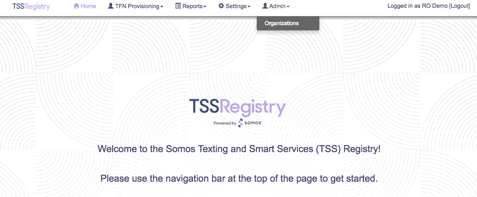
- Mouse over “Admin” in the upper navigation bar and select “Organizations.”

- Click the pen and tablet (edit) icon on the far right column to edit your organization. Note that your RespOrg will be at the top of the list.
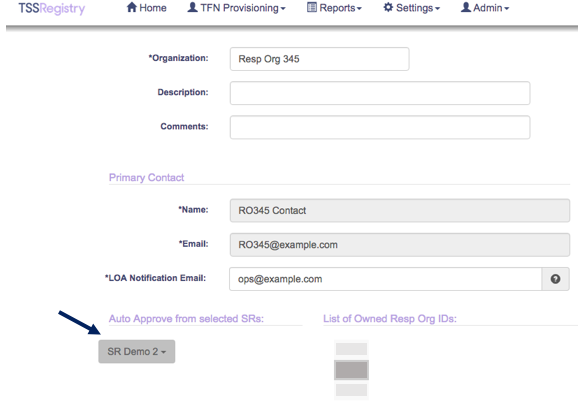
- Under “Auto Approve from selected SRs,” click the drop-down menu.
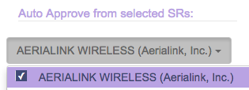
- Select Aerialink by checking the checkbox.
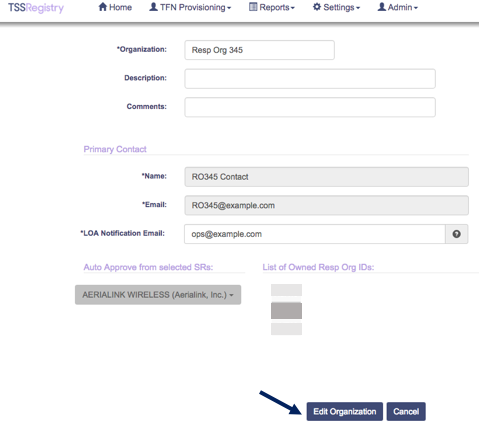
- Click the blue “Edit Organization” button at the bottom to save the changes.
Request Steps for 10DLC
Once you have submitted your completed LOA for industry validation, a ticket will be created which will be updated as the order status progresses.
Convey will validate the information provided in your LOA. Your request will be either “approved” and moved forward or “rejected” due to insufficient information or an inability to text-enable the number. You will be notified of the status via support ticket to discuss next steps if needed.
- If the request is “approved” by Convey, your number will be assigned to your Convey account and activated for messaging.
- If the request is “rejected,” you may be able to resubmit the LOA with additional information as needed, depending upon the cause of the rejection.
Approval & Activation
Note that the registration requirements for BYON are the same as those for numbers leased directly through Convey. 10DLC numbers must be published to a registered 10DLC campaign before sending traffic. For toll-free, Sender Verification is required.
Comments
0 comments
Article is closed for comments.